
UPC Codes for Amazon Listings
Every new product on Amazon needs a unique UPC. Buy yours here, paste it into Seller Central, and your listing is live within minutes. One payment, no renewal fees, codes you own for life.
- Accepted by Amazon
- Delivered by email in minutes
- No renewal fees, ever
- 90-day money-back guarantee
Why Amazon asks for a UPC
Amazon uses the UPC (which it calls a GTIN or External Product ID) to give every product one catalog entry.
How to list a product on Amazon with your UPC
Four steps from purchase to a live product page.
- Buy your UPC
Choose a quantity above. Your codes, spreadsheet and barcode images arrive by email within minutes.
- Open Seller Central
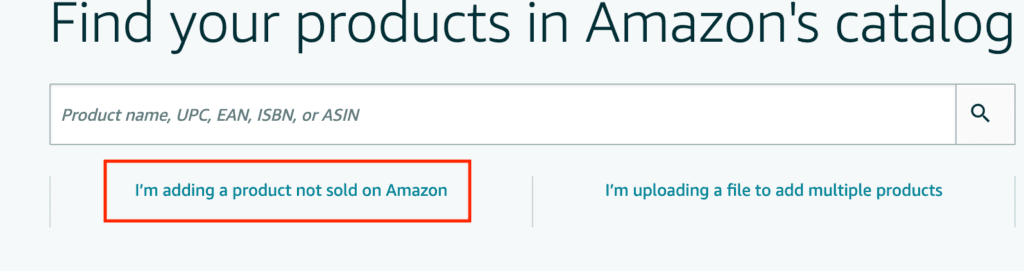
Go to Catalog, then Add Products, and choose "I'm adding a product not sold on Amazon".
- Enter the product details
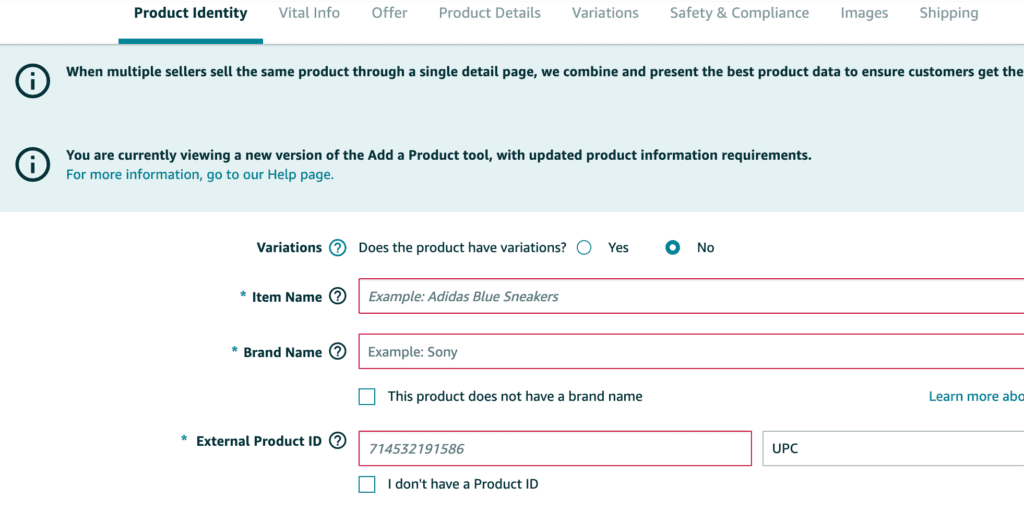
Fill in the title, brand and category, then paste your UPC into the External Product ID field and select "UPC".
- Go live
Submit the listing. New product pages usually appear on Amazon within 15 minutes to a few hours.
Step-by-step walkthrough
Where the UPC goes in Seller Central, screen by screen.
1. Add a product
In Seller Central open the Catalog menu, click Add Products, then choose "I'm adding a product not sold on Amazon".
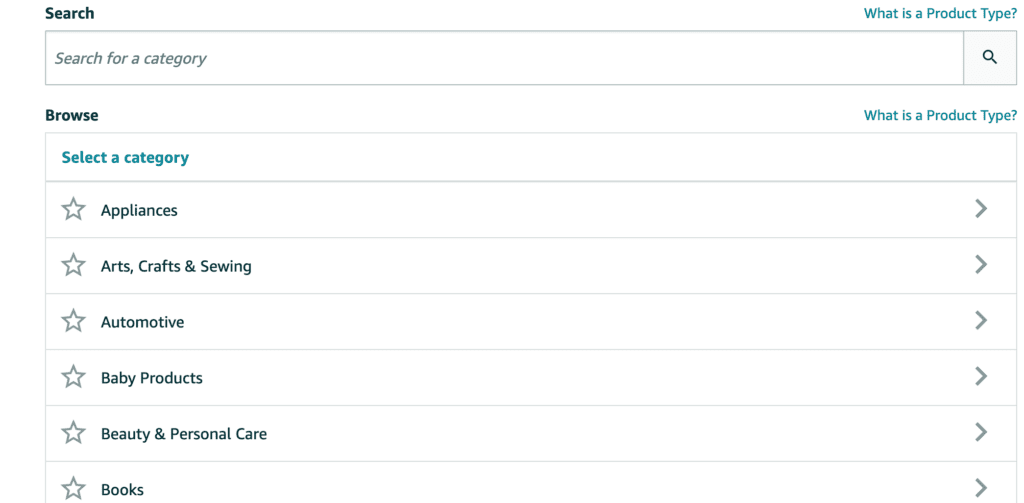
2. Pick the category
Choose the most specific category that matches your product. The category decides which attributes Amazon asks for and where shoppers find you.
3. Enter your UPC
On the Product Identity tab find External Product ID. Paste the 12-digit code and pick UPC from the dropdown, not EAN or JAN.
How many UPCs does my Amazon catalog need?
One per child ASIN. Variations are separate products to Amazon.
Apparel
A shirt in 3 sizes and 2 colours is 6 child listings, so 6 UPCs. The parent listing does not need one.
Consumables
Each flavour and each size is its own code: lemon 12 oz, lemon 20 oz and lime 12 oz are 3 UPCs.
Bundles and multipacks
A single, a 3-pack and a 6-pack of the same item are 3 products and need 3 codes.
Buying extra is cheap: 10 codes cost $30 and 100 cost $90. Unused codes never expire, so you can grow into them.
Own your codes instead of renting them
Three ways to get a UPC for Amazon. Only one is a one-time purchase with instant delivery and a real company behind it.
| UPCs.com | Annual-fee registry | Cheap resellers | |
|---|---|---|---|
| Ownership | Yours for life | Rented; stops when you stop paying | Often unclear or reused |
| Cost for 10 codes | $30, once | $250 up front + $50 every year | Varies |
| Delivery | Minutes, by email | Days | Manual, sometimes never |
| Certificate & barcode images | Included | Extra | Rarely |
| Help with Amazon errors | Real people, same day | Ticket queue | None |
| Track record | 200,000+ businesses since the 1990s | — | Unknown |
The product identifiers Amazon uses
Common Amazon listing errors and how to fix them
Most errors come from the brand or attribute fields, not the code. Here are the ones we see most.
Stuck on an error? Send us a screenshot of the message. We have been solving Amazon listing problems for sellers for over a decade and usually reply the same day.
Contact supportWondering why a lookup shows a different company name for your code? Our numbers come from prefixes issued before 2002, so registries show the original block owner. The code is still yours. Full explanation.
Trusted by 200,000+ product sellers




Our codes are used by sellers on Amazon, Walmart, eBay, Shopify, Etsy, Target Plus and in retail stores worldwide.
Frequently asked questions
Does Amazon accept UPC codes from UPCs.com?
Yes. Sellers have used our codes to create Amazon listings for over 20 years, and 200,000+ businesses have bought from us. If Amazon ever rejects a code, we replace it or refund you within 90 days.
Do I need a different UPC for each variation?
Yes. Every child ASIN needs its own UPC: each size, colour, flavour or pack size. A parent listing does not need one.
Can I use the same UPC on Walmart, eBay and my own store?
Yes. The code identifies your product, not the marketplace. Use the same UPC everywhere you sell it.
Do I need to pay renewal fees?
No. You pay once and the codes are yours for life. No annual fees, no memberships, no expiry.
What if Amazon shows an error when I list?
Most errors are caused by the brand or attribute fields rather than the code itself. Check the fixes above, or send us a screenshot and we will walk you through it.
Do I get barcode images for FBA?
Every order includes the barcode images. For FBA, Amazon generates FNSKU labels from your listing; you can print those yourself or order printed FNSKU labels from us.
How quickly will I receive my codes?
Within minutes of payment. Your codes, a spreadsheet and the barcode image files are emailed to you and stay available for download in your account.
Ready to list on Amazon?
Pick your quantity, pay once, and your UPC codes arrive by email within minutes.
200,000+ businesses served · No renewal fees · 90-day money-back guarantee